Meet Clyde
Know what Claude is doing — without alt-tabbing.
A friendly menu bar companion for Claude Code on macOS. Real-time session tracking, attention alerts, and a review of where the day went.
A quick tour
Four views. Same source of truth.
Clyde lives in four places at once — pick the level of detail you want, switch on the fly.
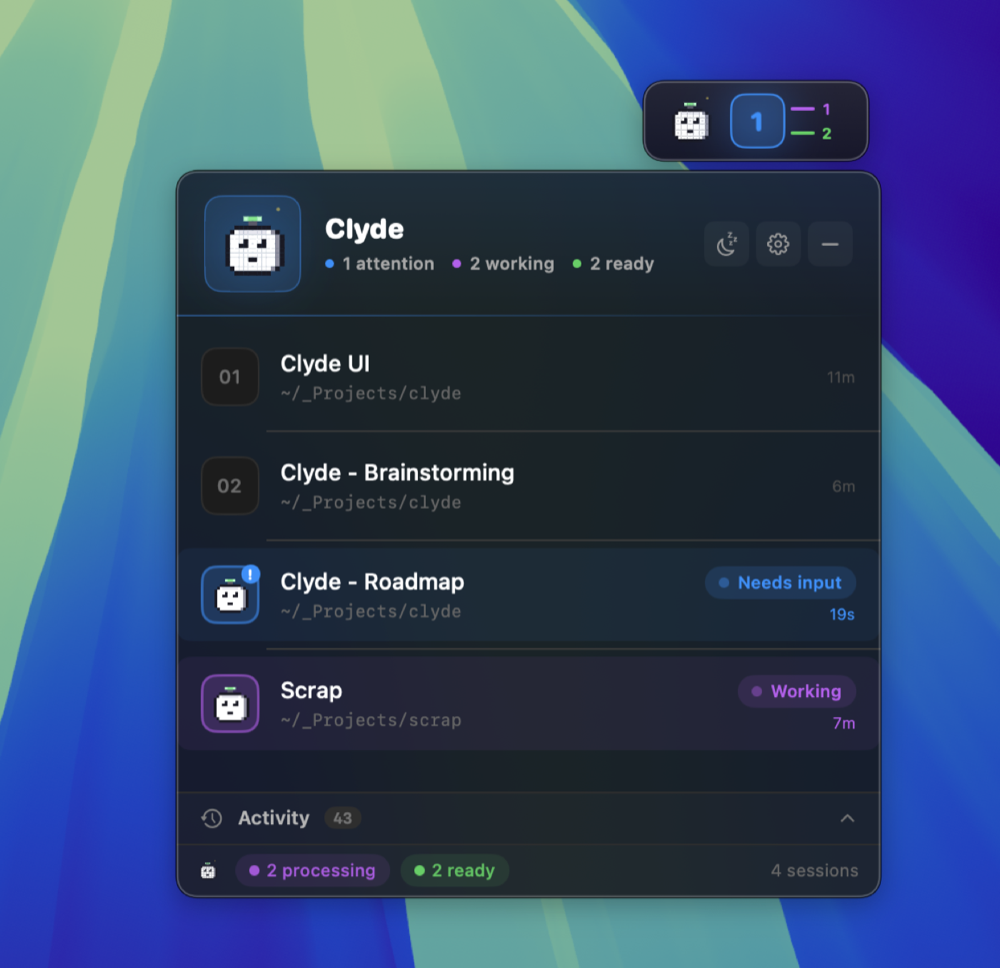
See every Claude session in one place.
The header counts the states at a glance. Under it, one row per session with its directory and what it is doing right now — whoever needs an answer first, then whoever is working. Click a row to focus its terminal, drag to reorder inside a state, name them whatever makes sense to you.
- Real‑time, hook‑driven — never polled
- Per‑session names, sounds, and ordering
- Activity timeline of every prompt & permission
New in 0.9
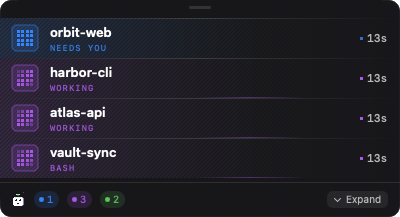
The rows, and nothing else.
The panel is built to be opened, read and closed. Compact mode drops the header, the activity trail and the summary bar and keeps the sessions — small enough to leave open beside the work it is reporting on. It is exactly as tall as what it shows, and it grows downward, so the top edge stays where you put it.
- Whoever needs an answer is always at the top
- Past your row limit, only the quiet sessions drop off
- Answer a permission request without leaving it
One floating capsule. Zero alt‑tabbing.
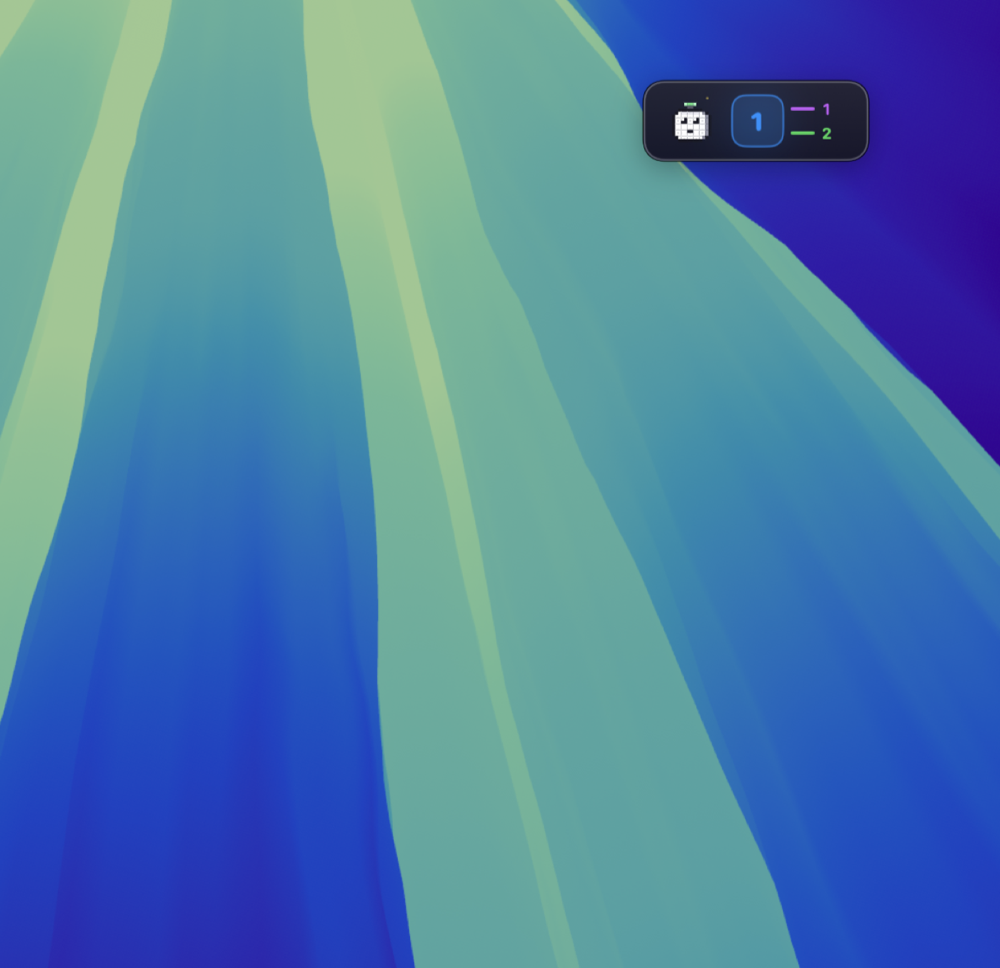
The widget lives wherever you drop it. The big number is the dominant state count; the two ticks on the right keep score of the others. It pulses gently when Claude is working, flashes blue when something needs you, and goes dark when nothing is up.
- Drag anywhere, snaps to screen edges
- Click to expand · global hotkey ⌃⌘C
- Hide entirely if you only want the menu bar
Lives in your menu bar. Quiet until it isn't.
Pixel‑accurate Clyde silhouette plus a colour‑coded capsule for the dominant state — purple = working, green = ready, blue = needs attention. When nothing is happening, the icon goes monochrome and stays out of your way.
- Template icon — adapts to light & dark menu bars
- Click for a full session dropdown
- Snooze with one click for deep‑work sessions

New in 0.9
Say yes without going back to the terminal.
Claude asks permission before it runs something. Answer it where you already are.
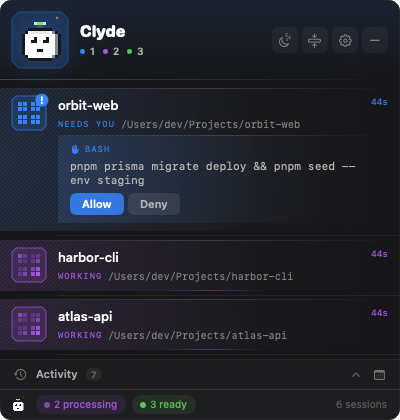
The question opens on the session that asked it.
The command is shown in full — wrapped, never shortened, because a truncated command invites approving something you did not read. Allow or Deny, and the session carries on. It works the same in the compact panel, which is the one you are most likely to have open.
- Miss it and nothing breaks. The window is a few seconds long. Let it pass and the terminal asks exactly as it always has.
- Clyde never decides on its own. No rules, no remembered answers, no "always allow". It relays your answer and nothing else.
- Off until you turn it on. The feature ships disabled; nothing waits on Clyde unless you asked it to.
Session review
Where did the day actually go?
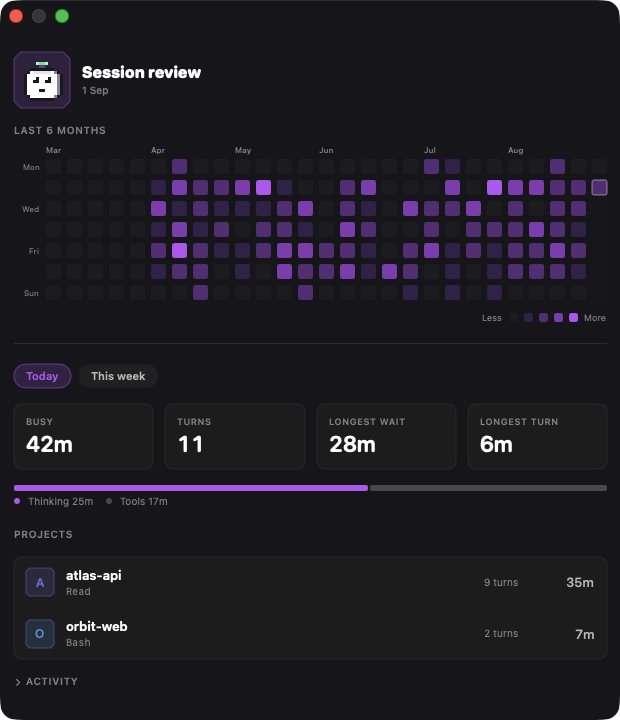
Clyde has always answered what Claude is doing right now. It now remembers what it did.
Six months of work, one square per day.
The review window opens on a calendar shaded by how long Claude worked — hover any day for the time, the turns and the project that took most of it. Underneath, the numbers for today or the week: how long Claude was busy, split into thinking and tool time, the two worst moments of the period, and where the time went by project.
- Busy, honestly counted. A turn's wall-clock includes every tool call, so Clyde shows the split rather than passing your test suite off as the model thinking.
- Longest wait, longest turn. Running totals mislead — leave a session overnight and it reads fourteen hours. The worst single moment on each side is the one you can act on.
- Per project, with the tool it leaned on. Time and turns for every repository you worked in — and a branch checked out in a worktree counts towards its project rather than appearing as one of its own.
- Stays on your Mac. Kept locally and indefinitely; Settings shows what it costs and clears it in one click. Tool names and summaries only — never a word of your conversations.
What it does
Stop tab-switching just to check on Claude.
Answer permission requests
Allow or deny from the panel, on the session that asked. Miss the moment and the terminal asks as usual — Clyde never decides on its own.
Real-time tracking
See exactly when Claude is working, idle, or waiting for permission. Powered by Claude Code's native hooks — instant, not polled.
Attention alerts
Sound and banner the moment Claude needs your input. Never miss a permission request again, no matter which window has focus.
Multi-session view
Track every Claude session across every terminal in one place. Drag to reorder, name them, jump back to the right window with a click.
Quiet by default
Lives in your menu bar. Press ⌃⌘C to expand, click to focus a session, snooze when you need quiet time.
Session review
An activity calendar of the last six months, plus busy time split into thinking and tools, the longest wait, and per-project totals. History stays on your Mac.
Agents & plans
See the subagents a session spawned and how far through its plan it is, nested under the session that started them — not just a spinner.
Worktrees & sandboxes
Sessions are badged with the git worktree they are working in, and Clyde tracks sessions running inside the cleat Docker sandbox alongside native ones.
Privacy-first
Everything stays on your Mac. No accounts, no telemetry, no analytics. Clyde never talks to a server — Claude or otherwise.
Open source
Audit the code, file issues, send PRs. Built in SwiftUI as a single self-contained Swift Package — no Xcode project required.
How it works
Three states, one menu bar item.
Clyde reads from Claude Code's hook events and shows the dominant state of all your sessions in a single capsule.
Ready
All your sessions finished what they were doing. Take a sip of coffee.
Working
Claude is processing a prompt or running a tool. The little dot orbits.
Needs you
Claude wants permission to do something. Clyde waves and rings.
Install
Two clicks. No accounts.
-
Download the latest
.dmgfrom GitHub Releases. - Drag Clyde into your Applications folder.
- Launch. Clyde will offer to install its Claude Code hook automatically — accept and you're done.
Support
If Clyde saves you time, consider supporting its development.
Clyde is free and MIT-licensed. There's no paid tier and no telemetry — it stays fully featured for everyone. If you'd like to chip in anyway, here are two ways: